
This week was a better and more productive week than the last one. I have been looking everywhere on Youtube, Google, StackOverflow, and Reddit to find out how to create a filter on Ettercap. Ettercap has filters that you can apply during an attack that can cause an action to occur. I need it so I can cause a certain attack while the victim is calling someone and there are four attacks I want to implement; an annoying phone call, mute call, and zombie call attack. The purpose of the filters is to create different attacks that a hacker can use against their targets. The format is usually in a form of if statements with actions after them. In the picture I sent, the first if statement says if the IP address is a stated then the packets of that call will be 174 packets and when it is 174 packets it will display ” PACKET DROPPED”. 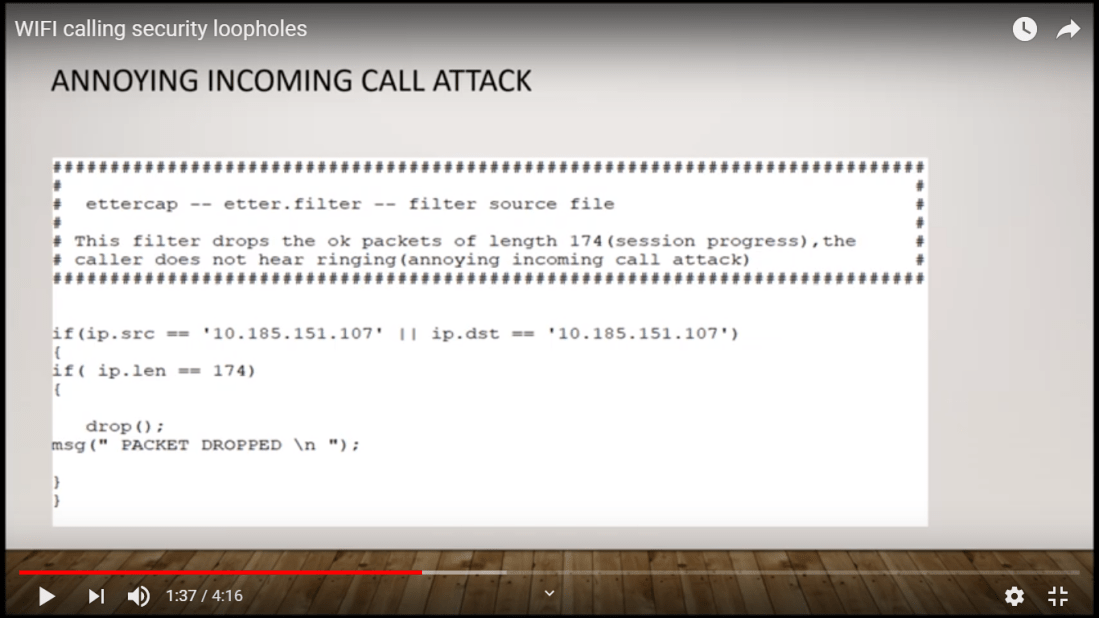
Fortunately, I found a Youtube video that showed how to create one and I was finally able to create the filter but another problem arose and it is how to get it to work. This may be a bug since I am using an older version of Ettercap and not the updated one but hopefully, I will be able to get it to work. I have also been successful using one of the Man in The Middle (MITM) features which is the Address Resolution Protocol (ARP) poisoning which sends fake ARP messages to the Wi-Fi network or router. I am able to retrieve the username and passwords from a victim if they are using an unsecured website. Along with that, I am also using the Wireshark to read the packets of the device I am attacking, I learned that I must first ARP poison the device first in order to eavesdrop on the packages so that the device thinks I am the router. I am kind of falling behind since I have not been successfully doing a telephony denial of service (TDoS) attack on my phone. It’s ok though because I should able to do an actual attack next week and come up with ideas to prevent the attacks from happening on unsecured Wi-Fi networks.
 Jalen Young's REU Experience